Gannon Novak

IMECache Permissions Errors with User Context Win32 Apps

App deployment is something just about every Intune admin must be comfortable with. Recently, most apps have become simpler to package and deploy. However, occasionally you’ll still have proprietary, legacy, or just poorly written apps that don’t contain silent installers or do things out of the ordinary. This was the case for an app I […]

IMECache Permissions Errors with User Context Win32 Apps Read More »

From COM to Web: Managing Microsoft 365 App Add‑Ins

The Issue As someone whose primary responsibility includes Endpoint Management, I received a question several weeks ago regarding managing Office add-ins on endpoints. Typically, Group Policy and/or Intune controlled this in the past. However, as things have changed with the M365 Apps over the last several years, so has managing the add-ins. Now, managing add-ins

From COM to Web: Managing Microsoft 365 App Add‑Ins Read More »

Autopilot Registered, Profile Assigned… but still getting Generic OOBE

I recently assisted a client with an unusual Autopilot (v1) issue I hadn’t seen before. While the solution turned out to be straightforward, it required dusting off some old Autopilot knowledge and revisiting the prerequisites and requirements. This organization had been using Autopilot for a few years without any issues, and then, seemingly out of

Autopilot Registered, Profile Assigned… but still getting Generic OOBE Read More »

Deploy custom Microsoft Word AutoCorrect replacement settings with Intune

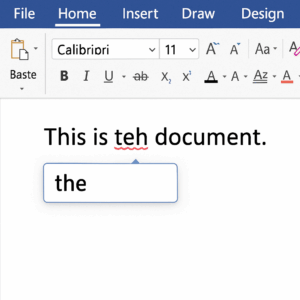
Most organizations are fine using the built-in autocorrect options in Microsoft Word. AutoCorrect will automatically fix commonly misspelled or mistyped words. For example, you may mistakenly type “teh” instead of “the”. AutoCorrect will automatically correct “teh” to “the” for you. The dictionary of autocomplete settings can be found in Word > File > Options >

Deploy custom Microsoft Word AutoCorrect replacement settings with Intune Read More »

Convert Entra Connect Synchronized Users To Cloud Managed Identities

If you’re using Entra Connect and you’re planning to eliminate Active Directory, you’ll eventually need to remove Entra Connect and convert all users to cloud-managed identities. Entra Connect synchronizes your AD identities with Entra, giving the users a cloud identity in addition to their on-prem identity. However, AD remains the source of authority for management.

Convert Entra Connect Synchronized Users To Cloud Managed Identities Read More »